
Download Visual COBOL Personal Edition – COBOL, Visual Studio, development environment, programming, software development, student tool, free software, Windows
Overview
Visual COBOL Personal Edition is a specialized development environment designed for students and non-commercial users seeking to learn and work with COBOL, a foundational programming language still in use across critical systems in banking, government, and enterprise infrastructure. This edition bridges legacy technology with modern development practices by integrating COBOL into Microsoft Visual Studio 2010, enabling a contemporary coding experience on Windows platforms. Its primary purpose is to lower the barrier to entry for newcomers in software development by offering a free, accessible toolset that supports learning, experimentation, and skill-building without financial cost.
The app addresses the challenge of accessing professional-grade COBOL tools, which are often expensive and restricted to commercial enterprises. By making this environment available at no cost to students and hobbyists, it empowers individuals to explore a high-demand skill set in a real-world context. The target users include computer science students, self-taught developers, educators, and anyone interested in understanding how legacy systems continue to power modern digital infrastructure. Although the developer did not provide additional technical details about the underlying architecture or integration depth, the app's compatibility with Visual Studio 2010 suggests a focus on stability and familiarity for users already accustomed to Microsoft’s IDE ecosystem.
Given COBOL’s enduring presence in mission-critical systems, learning this language offers tangible career advantages. Visual COBOL Personal Edition plays a significant role in the software development ecosystem by preserving and modernizing access to a vital technology, ensuring that future developers can contribute to and maintain essential digital infrastructure.
Key Features & Functionality
- Integration with Visual Studio 2010: The environment seamlessly embeds COBOL development within Microsoft’s widely used IDE, allowing users to leverage familiar tools such as code editors, debuggers, and project management features. This integration enables a smooth workflow for writing, testing, and debugging COBOL applications.
- Modern COBOL Language Support: By transforming COBOL into a .NET-compatible language, the app supports modern programming paradigms such as object-oriented design, event-driven logic, and integration with contemporary frameworks and libraries.
- Student and Non-Commercial Access: The edition is exclusively available to students and non-commercial users, removing financial barriers to entry and promoting inclusive learning in software development.
- Cross-Platform Application Development: Users can develop COBOL applications that are deployable across distributed environments, including mainframes and modern servers, preparing learners for real-world enterprise scenarios.
- Learning-Centric Design: The interface and toolset are structured to support educational use, with built-in templates, sample projects, and documentation to guide users through foundational and advanced concepts.
For example, a computer science student can use the app to create a payroll processing system using COBOL syntax within a Visual Studio workspace, gaining hands-on experience with both legacy logic and modern development practices. Similarly, a self-learner exploring enterprise systems can use the app to reverse-engineer and modify existing COBOL programs, deepening their understanding of system architecture and data processing.
Interface, UX & Performance
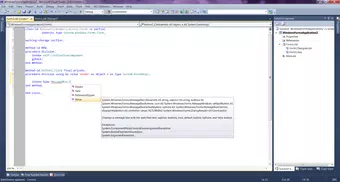
The user interface of Visual COBOL Personal Edition is built upon the Visual Studio 2010 framework, which provides a structured, modular layout with customizable tool windows, solution explorers, and code editors. The visual style follows the standard Windows desktop aesthetic, ensuring consistency with other Microsoft development tools. Navigation is intuitive, with clear menus, tabbed document interfaces, and context-sensitive help, making it accessible for users with minimal prior experience in COBOL or IDEs.
Although the developer did not list formal performance metrics, the app’s reliance on a mature IDE suggests stable operation across mid-range and higher-end Windows devices. Responsiveness is expected to be consistent during typical development tasks such as code editing, syntax highlighting, and debugging. The app’s performance on low-end hardware may vary, but no specific limitations were disclosed. Stability appears to be prioritized, given the tool’s use in educational and learning environments where reliability is essential.
Users can expect a predictable experience when compiling and running COBOL programs, though the absence of real-time performance data prevents definitive claims. Overall, the interface is designed to reduce cognitive load, allowing learners to focus on coding logic rather than navigating complex tooling.
Platform Compatibility & Technical Requirements
Visual COBOL Personal Edition is designed exclusively for the Windows platform, requiring a Windows operating system to function. The software version is 2.2, with a file size of 1.3 GB, indicating a substantial installation package that likely includes the full Visual Studio 2010 integration suite, compilers, runtime libraries, and sample projects. The developer did not specify minimum OS requirements, nor did they list compatibility details for newer Windows versions beyond the original Visual Studio 2010 support.
Given the release date of January 28, 2013, and the reliance on Visual Studio 2010, users should be aware that the app may not function optimally on modern Windows 10 or Windows 11 systems without compatibility mode or additional configuration. The lack of updated system requirements makes it challenging to assess performance on current devices. However, the app remains a viable option for users running older Windows environments or those using virtual machines for educational purposes.
Pros and Cons
Pros
- Free access for students and non-commercial users, promoting inclusive learning.
- Seamless integration with Visual Studio 2010, providing a familiar and powerful IDE.
- Supports modern COBOL development with .NET compatibility and object-oriented features.
- Offers a practical way to learn a high-demand, legacy programming language.
- Encourages skill development for careers in enterprise software and system maintenance.
Cons
- Outdated platform dependency on Visual Studio 2010, limiting compatibility with modern Windows systems.
- Limited availability—restricted to non-commercial users only.
- Large file size (1.3 GB) may be a concern for users with limited storage.
- No official updates or support details were provided by the developer.
- Performance on current devices may require compatibility settings or virtualization.
FAQ
Is Visual COBOL Personal Edition available for free?
Yes, the app is offered at no cost to students and non-commercial users. It is not available for commercial or enterprise use.
Can I use this app on Windows 11 or Windows 10?
While the app was originally designed for older Windows versions, it may run on Windows 10 and 11 with compatibility mode or through virtualization. Specific compatibility details were not provided by the developer.
What programming language does this app support?
Visual COBOL Personal Edition supports COBOL, with modern enhancements that allow integration with .NET frameworks and object-oriented programming practices.
Do I need Visual Studio 2010 to install this app?
Yes, the app is built as an extension for Visual Studio 2010. It requires the full installation of Visual Studio 2010 to function properly.
Is the app secure to download and use?
The app is developed by Micro Focus, a reputable software company. As long as it is downloaded from official sources, it is considered secure for educational use. However, users should verify the source and avoid third-party sites.
Final Thoughts
Visual COBOL Personal Edition stands out as a unique and valuable tool for anyone interested in mastering COBOL within a modern development context. Its integration with Visual Studio 2010 offers a professional-grade environment that is both accessible and educational. While the app’s age and platform limitations present challenges, its core strengths—free access, real-world relevance, and modernized COBOL capabilities—make it an essential resource for students and learners in computer science, software engineering, and enterprise technology.
For those seeking to understand the backbone of legacy systems or build a competitive edge in the job market, this app provides a practical, hands-on pathway. It’s not just a programming tool—it’s a gateway to understanding how software infrastructure evolves and persists over decades.
Download Visual COBOL Personal Edition now


